Update: A challenger appears. My security researcher friend Fox has challenged me to a duel. See her blog post for the details.
This is part of the Reflection series in which I go through my old projects and tell their story.
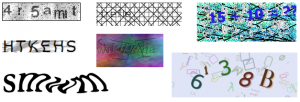
CAPTCHAs have become an integral part of the web in the last few years. Almost everyone on the web has encountered those twisted pictures, probably when signing up to an email service. They come in various shapes, sizes, colors and cats. When they first became popular, there was an explosion of different types of schemes that services used (who can forget Rapidshare’s cat captcha?).
Now as with every security measure there is a compromise between usability and protection. Some of the easier CAPTCHAs were broken using only OCR software, while some of the latest reCAPTCHA images are hard even for a human to solve (interesting but out dated chart).
One such service was UrlShield. You would give UrlShield a URL you want to protect from bots and it created a page with a CAPTCHA that when solved correctly redirected you to your original URL. Simple enough. I can certainly see a use for such a service, for example if you want to give out promotional coupons and don’t want bots to snatch all of them. The service became popular in some file sharing sites for the same exact reason.
The particular image this site was generating had a checkerboard background with 4 characters all in different colors, sometimes overlapping. It was pretty easy for a human to parse it.
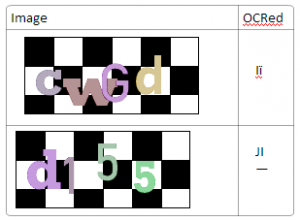
It even works pretty good against OCR. I used Microsoft OneNote OCR feature which uses the commercial OmniPage software to create the second column.
So far so good? Well, no. This scheme is flawed because it is easy to transform the image – remove the background and segment it (split it to region that each contains a single character), allowing OCR tools to easily get the letter. To remove the background you just clear all the black pixels out of the image. To segment it all you need to do is choose one color and mask all the others, which means you’ll end up with a single letter, as each letter is in a different color. This is what you end up with:
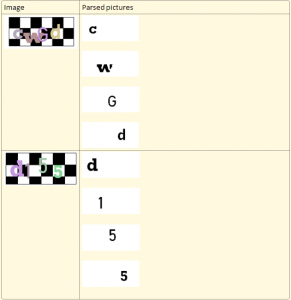
OneNote has no problem parsing each of these to a letter.
The process described above is exactly what UnUrlShield does. It’s a simple Python script that use the Python Imaging Library to read the image. Then it counts all the colors that appear more than a certain threshold (MIN_PIXEL_PER_LETTER_COUNT) and saves each color’s pixel location. Lastly it goes through the colors, creating an image with only that color’s pixel locations.
Is there a lesson here about CAPTCHAs? I think so. UrlShield is now some kind of ad/malware site. Even complicated CAPTCHAs can be broken, or even better – be defeated by side-channel attacks like having an army of low-cost workers break them on-demand (The comments of this article are a treasure trove of irony) and sometimes people are even fooled into breaking CAPTCHAs. This is why it amazes me they are still around, annoying normal regular people while also being broken by even slightly motivated attackers.
Are there no solutions to spam? Of course there are! In fact gmail does a great job at stopping 100% of my spam using things like blacklisting known spammers, Bayesian filtering, “crowd-sourcing” protection (the “mark as spam” button) and other tools that don’t rely on CAPTCHAs.
Do you have good examples of silly, easily broken or bizzare CAPTCHAs? Did you find an easy way around some services blocked by CAPTCHAs? Leave a comment below and tell me about it!